
The AI reply step in flows
Let AI answer inside a flow, collect details from the customer and leave by the right way out.
AI Assistant5 steps·4 min read
- 1
Add the AI reply step
Go to Automation and open a flow, or start a new one. From Drag a step, drag AI reply onto the canvas and connect it. Click the step to edit it.
app.swiftcampaigns.com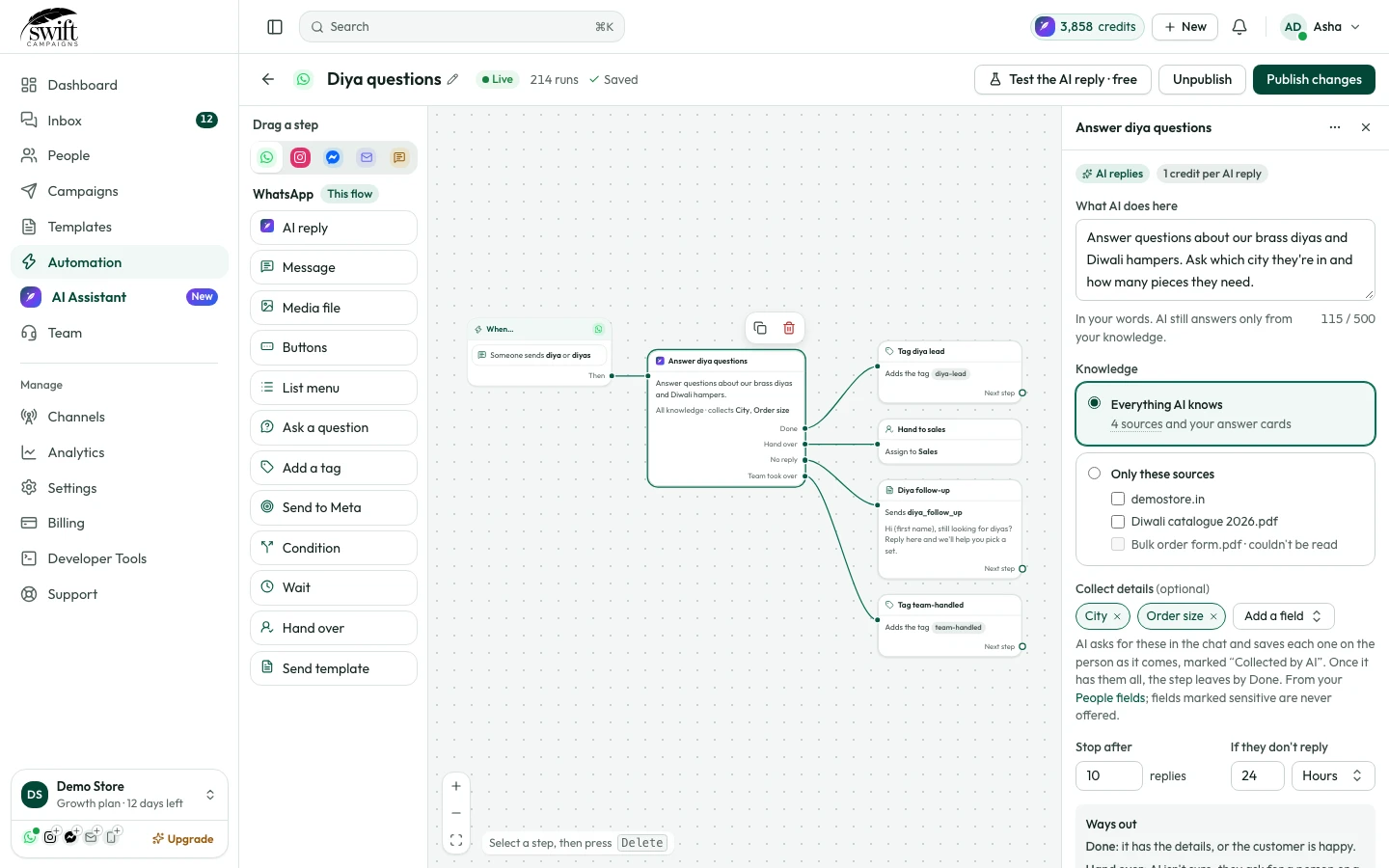
- 2
Tell AI what to do here
Under What AI does here, write in your words what this step is for, for example "Answer questions about our brass diyas and ask which city they're in". AI still answers only from your knowledge. Under Knowledge, keep Everything AI knows or pick Only these sources.
- 3
Collect details
Under Collect details (optional), click Add a field and pick fields such as City or Order size. AI asks for them in the chat and saves each one on the person, marked "Collected by AI".
- 4
Set when the step ends
Set Stop after a number of replies, and If they don't reply after how many hours or days. Then connect the Ways out: Done (AI has the details, or the customer is happy), Hand over, No reply and Team took over. A way out with nothing connected ends the flow.
- 5
Test it, then publish
Click Test the AI reply · free to try the step in Test chat, then Publish changes. Each AI reply in the flow uses 1 credit.
Good to know
- On WhatsApp, follow No reply with a template: a normal message can't go after 24 hours.