
How to start a flow from Instagram ice breakers
Turn the questions people see when they first open a chat with you into automations.
Automation4 steps·2 min read
- 1
Open an Instagram flow
Instagram and Facebook are rolling out; when they're on for your business you'll see them under Channels. Then go to Automation › Flows and open an Instagram flow, or click New automation, choose Instagram and Start from a blank flow.
- 2
Add the ice breaker
On the When… card, click Add trigger and choose Ice breaker (someone taps one of your 4 questions).
- 3
Pick the question
Choose the Account, then the Question this flow answers. Instagram shows these questions when someone opens a chat with you for the first time. Each question can start one flow.
app.swiftcampaigns.com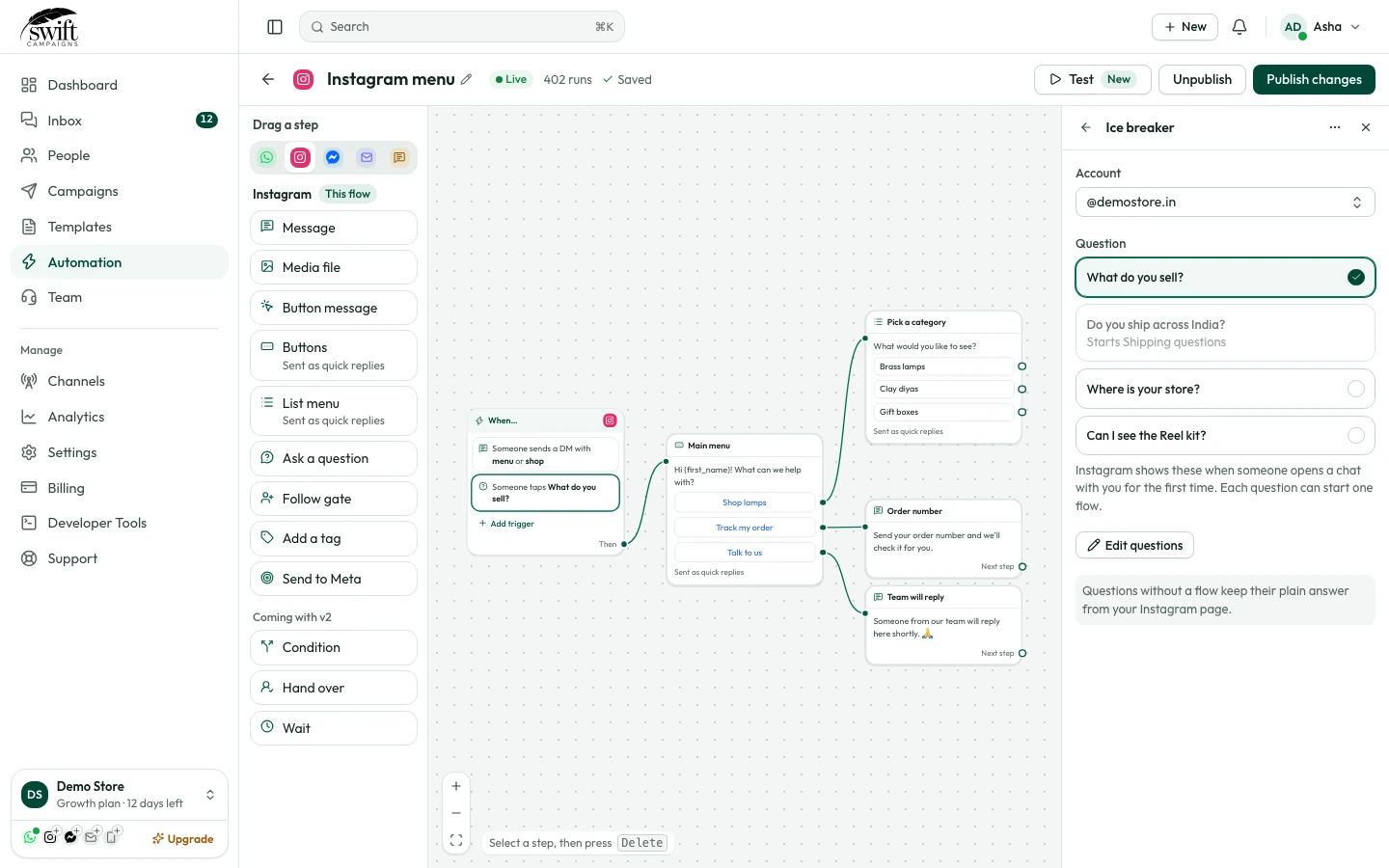
- 4
Add steps and publish
Add the steps that answer the question, then click Publish. To change the questions themselves, click Edit questions.
Good to know
- Questions without a flow keep their plain answer from your Instagram page.